Use The Terminal Menu
The terminal menu uses the same native wallets and commands as the CLI. It is
not JAM, and does not open JAM or reference-implementation .jmdat wallet files.
Install
Complete installation and backend setup. The menu also
needs whiptail (on Debian or Ubuntu, sudo apt install whiptail). In an
activated installation, run:
jm-ng
Raspiblitz installs its menu at /home/joinmarketng/menu.sh and manages maker
service control through its integration.
Main Menu
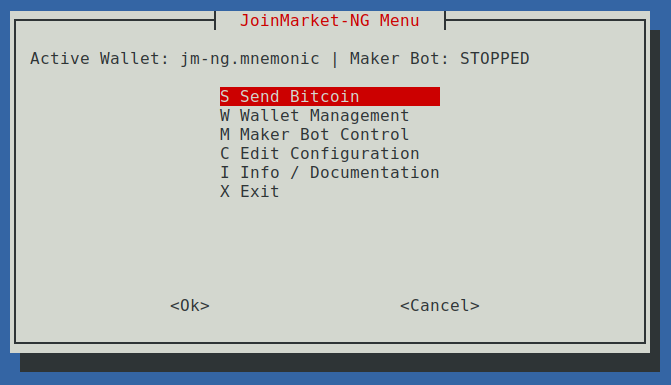
Check the active wallet in the header before an operation. Use Wallet Management to create, import, or select a wallet. Follow the same backup requirements as with the CLI.
Send Bitcoin
Choose a source mixdepth, amount in satoshis, and destination. Zero counterparties means an ordinary payment, not a CoinJoin. Zero amount means a sweep, not a zero-value payment. Review the fee and destination before confirming.
Manual coin control is limited to one mixdepth. See wallet tasks for direct payments and the taker guide for CoinJoins.
Wallet Management
Use the balance, history, address, and freeze controls to inspect the selected wallet. Viewing recovery words is sensitive; do not screen-share or capture it. The BIP39 passphrase prompt is separate from wallet-file decryption. Verify the derived wallet identity before accepting it, especially after recovery.
Ordinary wallets no longer get an unconditional BIP39 question. Config Center's Configure BIP39 Onboarding enables advanced generation/import and prompting for unregistered wallets. Registered wallet requirements apply independently of that setting. Supplied credentials still support unattended services.
After upgrading, the first unlock confirms the wallet automatically when it matches the fingerprint recorded by the previous release. Otherwise use Register Derived Wallet Identity with the intended passphrase and compare its fingerprint with your records; the first registered identity is selected. Use Select Registered Wallet Identity to switch between several passphrase wallets sharing a mnemonic file. The menu shows the selected fingerprint; neither registration nor selection stores a passphrase.
jm-ng runs the menu with the Python and jm-* commands installed next to it.
Launching the menu script directly, as Raspiblitz does, still prefers the
default virtual environment. Update only runs when the menu uses the
installation the updater manages; otherwise it explains how to update the
running one. See Multiple Installations.
CoinJoin History shows recorded data without synchronization. For registered wallets it requires neither credential. Refresh / Reconstruct Wallet History explicitly unlocks and synchronizes, including deferred reconstruction. Legacy unregistered files may still require unlocking to identify the wallet; register and select their identity to enable passwordless viewing. Refresh is not a claim that historical recovery coverage is complete.
Maker Bot Control
Start, stop, and inspect the maker here. On Raspiblitz the menu controls a systemd service; standalone installations manage a local maker process.
Encrypted Wallet Password Handling
Starting an encrypted wallet requires its password. Choosing to store it writes
it in plain text to config.toml for unattended startup. Declining permanent
storage does not remove all exposure: on Raspiblitz it is staged in a
permission-restricted .maker.env file while the maker runs. Other wallet
commands can reuse that staged credential. Protect the host in either case.
Use unattended maker guidance to decide whether automatic startup is appropriate; do not assume wallet-file encryption protects against someone who can also read the unlock credentials.
On Raspiblitz the menu also stages the optional BIP39 passphrase and an expected
wallet fingerprint in .maker.env. Both credentials are plaintext, even when
permanent storage was declined. Staging validates the selected identity before
writing; a failed write or canceled restart leaves the running maker untouched.
Restart validates new credentials before stopping the old process.
Matching staged BIP39 credentials are reused even when onboarding is disabled.
Restaging unbound or mismatched BIP39 credentials requires an explicit credential
or a confirmed prompt; missing identity metadata never authorizes replacing them
with an empty passphrase.
After upgrading, BIP39 staging without an expected fingerprint must be restaged explicitly from Start / Restart Maker. Password-only legacy staging remains usable. No identity registration, rescan, or credential deletion happens on upgrade. A mismatched staged fingerprint prevents wallet activity.
The menu preserves leading, embedded, and trailing newlines in configured and staged credentials. Older versions could strip trailing LF or read only the first line of a staged value. Existing matching staging continues selecting its bound wallet, even if that wallet used a truncated credential. Restaging from config requires explicit fingerprint confirmation when restoring trailing LF would replace that matching prefix-wallet binding; declining leaves staging untouched. No automatic rewrite or rescan occurs. Without a binding, the menu cannot identify a previously truncated wallet: compare the exact credential's fingerprint with independent records before wallet activity. Lost characters cannot be recovered from staging alone; keep an independent backup of the complete passphrase.
Config Center can save a BIP39 passphrase to config.toml only after an explicit
plaintext-storage warning and wallet confirmation. This is different from the
operation-local cache used by wallet commands. Switching mnemonic files clears
stored credentials and staging; selecting another registered identity clears the
stored BIP39 passphrase and staging. Protect the host and back up the mnemonic
and passphrase separately.
Fidelity Bonds
Read bond operations before creating a bond. A lock cannot be undone early. The menu's bond controls do not replace backup and signer-compatibility checks.
Logging
The menu follows [logging] level unless overridden. An explicit
[tui] log_level overrides it for commands launched by the menu; use WARNING
for quiet output or DEBUG for troubleshooting. An initial LOGGING__LEVEL
environment variable takes precedence at startup.
Config Center's log-level selector saves an override and applies it to subsequent commands launched in that menu session. Choose Follow global logging to remove the saved override and return to the global level or initial session environment. It does not reconfigure an already-running maker. Restart standalone makers to pick up the change; externally managed services, including Raspiblitz, use their own logging configuration.
On upgrade, existing explicit TUI overrides remain unchanged. Configurations without an override now follow global logging instead of defaulting to WARNING.